Monday, August 8, 2011

Make your Own Text to Talk Software in Windows XP

Hello here I will Show You How to make the talking software in Windows Xp... Here we will utilize the default voices of Xp. Using this software you can make Windows to Speak the Words that you type..So Guys Read On..


Steps:

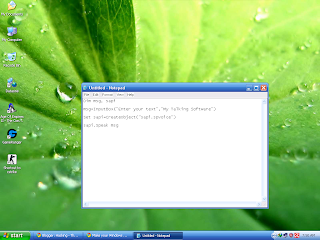
1. Open the Notepad File and Copy the Text Given Below..


Dim msg, sapi
 
msg=InputBox("Enter your text","My Talking Software")
 
Set sapi=CreateObject("sapi.spvoice")
 
sapi.Speak msg


2. Now Save the File as anyname.vbs (note that vbs Extension).


3.Now Open the anyname .vbs  file and Write the Text that you want that Xp will speak...


4. Click on Ok and See that your Xp is Spaeking the Text...


Enjoy and Have Fun!

Extreme Hack - Install Windows Xp in 10 minutes

Hey Guys This Time I come Up With another Extreme Hack That You Will Never Imagine But Its Truth and We have Done It. This Time I will explain How to Install Windows In Just 10 minutes??

As We all know that During Formatting a Computer After the File Copying is Completed then windows Require 39 Minutes Time...But What Extreme In It.... Yes We can Bypass this fking Time .... How TO DO IT??? So read On..

I have Included Snaps That will help you all....


INSTALLING XP IN 10 MINUTES!

STEP1 : After the Copy Part is Over ... System is Rebooted as we all know In general Foramatting Procedure...

Now After Reboot The Below Image Will Appear....


STEP 2: Now As This Image APPEARS You Have to Press  "Shift + F10 "  . This Will Open The command Prompt...  Now type  taskmgr  in it. This will open the Task manager .


STEP 3 : After The task Manager Opens Goto Processes ... And Find "Setup.exe"  process and Right CLICK on It.... and set the Priority to Highest....


STEP 4: Now Just Watch the Set It will take around 9 minutes and 2 minutes for Tolerance(depends System to system)....


Thats the Overall Tutorial...Hope You all Have LIKED IT...


So When you Format your PC Next Time It will Really Save Your TIME i.e around 20 to 25 minutes...


COMMENTS PLEASE !

Best Password Hacking Breaking Tools 2011 Link Updated

Hello Friends , Today I am sharing with you my latest Collection of "Best Password Hacking Tools 2011". Using this password hacking kit you will be able to crack a lot of passwords like Windows Admin password, pdf passwords, zip files passwords, document passwords, rar passwords and much more.. I am sure you will like this post.


best hacking tools, password crackers, password hacking softwares


This Password Hacking Kit Consists of following Password Hacking Breaking Tools:
1. PDF Password Remover
2. Windows XP Admin Password Remover
3. Zip File Password Cracker.
4. SQL Password Remover
5. Microsoft Office Password Remover.
6. Microsoft Windows Vista Password Remover.
7. Rar File Password Cracker
8. Windows Password Recovery Kit
9. Password Changer.
10. Distributed File Password Recovery..
and much more..


As the name of the tools suggests its a complete password hacking Kit. So guys Enjoy Latest Hacking tools ..


How to Use it??
1. Download the Password Hacking Kit From Below:


2. Extract the file and Install it.

3. Then Register them and use it. ( all tools contains Full serial keys and patches)...


Happy Hacking Friends, I hope You all Like my post. If you have any Queries Please Comment. By Rohit Khatri 

Saturday, August 6, 2011

Remove Write Protection On USB Pen Drive or Memory Card or iPod

In the past we had received so many problems from the readers who have a problem in copying files on their USB portable devices like pen drives, memory card and iPod etc.

usb-drive-write-protected

According to the mails we had received about this problem, people have seen the following errors when their thumbs drives, memory card etc becomes write protected.

  • Cannot copy files and folders, drive is write protected
  • Cannot format the drive, drive is write protected
  • The disk is write protected
  • Remove write protection or use another disk
  • Media is write protected

Some times people say that suddenly their drive become write protected and they are not able to delete any files and folder on the drive and also not able to copy new files and folder to USB portable drive.

Let’s see how can you remove write protection on your portable devices like pen drives, memory cards, iPod and other USB mass storage devices.

Fix:

Write Protection on any portable USB Device can be applied by the physical lock provided on the card adjuster or some times provided on the pen drives, so make sure to make your drive not write protected by moving the lock in right direction.

But even after moving the physical lock for write protection the problem can happen due to some virus action. This happens when some virus or script which applies the registry hack to make any drive write protect when connected to the computer, In that case follow the procedure below to remove write protection from your pen drive.

1. Open Start Menu >> Run, type regedit and press Enter, this will open the registry editor.

2. Navigate to the following path:

HKEY_LOCAL_MACHINE\SYSTEM\CurrentControlSet\Control\StorageDevicePolicies

Note: If the registry key StorageDevicePolicies key does not exist, you will need to create it

Download this batch file called add.bat from here, and double click after download the key will be automatically added to registry.

write-protection-registry

3. Double click the key WriteProtect in the right pane and set the value to 0 in the Value Data Box and press OK button

disable-write-protection

 p>

4. Exit Registry, restart your computer and then again re-connect your USB pen drive on your computer. That is it, done.

In case you still find an issue, please leave a comment below.


Updated on 28th May 2009

After a lot of user comments telling that the above method does not work for them, we tell you another method which you can follow to solve the “Pen Drive is Write Protected” problem.

If the above method does not work for you, follow the below steps:

1. Copy all the important data from this drive to your computer because this method will format the drive and erase all the data on the pen drive.

2. Now download the Apacer Formatting Utility, Unzip this utility to a folder on your hard disk, preferably on a folder on desktop screen for easy access (Do Not Try To Save it on pen drive). Keep your pen drive plugged in, and double click on the Start.bat file in the folder where you unzipped the above utility. This will start formatting your pen drive, wait till the formatting completes and the LED on your pen drive stops blinking. Remove your pen drive after than and plug it in again.

The above two steps will solve the problem. If you still face the problem, follow the below steps:

1. Goto Start > Run, type cmd and press enter, this will open command prompt.

2. Type the following command on the command prompt replacing X with the drive letter of your pen drive.

CHKDSK X: /F

The above two methods will help you fix the problem.

Best Mobile Call Recording Softwares(7+ softwares)


Mobile Call Recorders

8 Call Recorders For Nokia (No-Beep) | SIZE 7.5MB 


Here is the best ever Call-Recorders for Nokia Symbian S60 3rd and 5th Edition Devices, for the Help of All the Visitor's who need a No-Beep and a Wonderful Call Recording Software.You can choose from a variety of Softwares.


CONTENTS:

1-Ultimate Portable Ultimate Voice Recorder v5.05

2-Ultimate Portable Ultimate Voice Recorder v5.75

3-Ultimate Portable Ultimate Voice Recorder v6.01

4-Ultimate Voice Recorder v6.1.1

5-Smartphoneware Best Call Recorder v1.04

6-Rock Your Mobile Call Recorder Pro v1.10

7-HongDi Tech DuDuN Recorder v4.30

8-Psiloc VoxTrack Personal v1.0


DOWNLOAD:

HOTFILE


ENJOY AND HAVE FUN!

Super Bluetooth Hack 2009 1.8.7 - Best Ever Mobile hack


Super Bluetooth Hack 2009 v1.8.7 | 5.8MB


This is a new version of Super Bluetooth Hack for conventional and mobile-based simbian.If you do not know what a Super Bluetooth Hack, this program through MDM can be controlled by other peopleпїЅs mobile phone at a distance 10-15 metres, itпїЅs Then (call from phone, read messages & contacts, change profile, restart phone, etc.)


Once connected to a another phone via bluetooth you can:

- read his messages

- read his contacts

- change profile

- play his ringtone even if phone is on silent

- play his songs(in his phone)

- restart the phone

- switch off the phone

- restore factory settings

- change ringing volume

- And here comes the best

пїЅCall from his phoneпїЅ it includes all call functions like hold etc.

And much much more пїЅ


Install:


1) Download

2) Pour on the mobile

3) Run the Installer (what you download, incidentally need JAVA)

4) He finds it, and you will be able to run software

5) Choose the language and going configured

6) Click Connection

7) Click search devices

8) Choose the пїЅvictimпїЅ

9) AND M A N A G E!!!


Year: 2009

Version: 1.8.7

Language: English, Slovak, Czech, German, Russian

Platform: mobile phone, program runs on Java

Download


400 Virus Source Codes - My Best Virus Code Collection


400 Virus Source Codes


  • Avispa.dr

  • Dark Avenger

  • AVA.550

  • Univ/a

  • Auspar.377

  • Auspar.338

  • OC/oops

  • Middle

  • Auspar.635

  • Aus-Term.mp.3490

  • Jeru.1413

  • OC/scud

  • Auspar.dr

  • Auspar.635

  • Auspar.615

  • Auspar

  • Aust.543

  • Auspar.424

  • Auspar.377

  • Auspar.338

  • Auspar.292a

  • Auspar.215

  • Auspar.187

  • Auspar

  • Univ/b

  • Aurea.653

  • Iron-Maiden

  • Akuku.1111

  • Akuku.889

  • Akuku.886

  • NRLG.b

  • Attitude

  • Attention.394

  • HLL.ow.4505

  • Attention.394.dam

  • Xany

  • Univ/g

  • Univ/q

  • Univ.cmp

  • OC/vcl

  • Atomant.2143

  • AT

  • Atomic.350

  • Astra.1010

  • Suriv.dr

  • Comasp

  • Shocker.cmp.7000

  • Tiebud

  • BtDr.b

  • Ash.743

  • Univ/r

  • Armagedon.y

  • Armagedon

  • Vienna

  • ARCV.Scy.1208

  • ARCV.Scroll.795ARCV.Scroll.dr)

  • ARCV.Sand.1172

  • ARCV.More

  • ARCV.Kiss

  • ARCV.Jo.986

  • ARCV.Jo.912a

  • ARCV.250.dr

  • ARCV.642

  • ARCV.639a

  • ARCV.1183.dr

  • ARCV.Anna.742.dr

  • ARCV.639a

  • ARCV.Jo.916

  • ARCV.839

  • ARCV.Slime.773

  • ARCV.Ice

  • ARCV.Ice

  • Univ/q

  • ARCV.330a

  • ARCV.255

  • Crew.2480

  • Univ/o

  • 7thSon.426

  • Arara.dr

  • Arara.1054

  • Arab.834

  • Armagedon.y

  • QScreen3

  • Suriv.1488

  • Suriv.dr

  • Dark Avenger.2000

  • Jerusalem.cr

  • Jerusalem.cr

  • APLittle.153

  • APLittle.150

  • APLittle.147

  • APLittle.142a

  • APLittle.118a

  • APLittle.153

  • Univ.topsy

  • Anti-Pascal

  • Tiny-GM.129

  • Jerusalem

  • BtDr.Unk2

  • Jeru.1605

  • AntiMIT

  • Antiexe

  • Murphy

  • Thanksgiving.mp.1253a

  • Anticad.3012a

  • Anticad.mp.4096.d

  • Anticad.2900

  • Anticad.mp.4096.a

  • Anticad.2646

  • Anthrax.mp.1024

  • Univ.ow/d

  • Vacsina.1206

  • ARCV.Anna.742.dr

  • HLLP.Animus

  • Andromeda

  • Jerusalem.ch

  • Jeru.1808.a

  • QZap141

  • Pixel.845

  • Pixel.k

  • Ambulance

  • AlphaStrike.2000

  • Alien.733.a

  • Alia.1023

  • YD.1049.a

  • Alex.1951

  • Brain

  • Albania

  • Alabama.1560.a

  • Akuku.886

  • Tiebud

  • BtDr.Aircop

  • BtDr.b

  • HLL.ow

  • HLL.cmp.8064

  • AHADisk

  • Agiplan

  • YDOC/vcl

  • Syslock.dropped

  • NRLG.b

  • V2P6.1993

  • Dead

  • BitAddict

  • ARCV.Scroll.795

  • ARCV.Scroll.dr

  • Acid.dr

  • and alot more...


Download

http://rapidshare.com/files/82708010/Virus_Source.zip


How To Repair Your Corrupted Windows System Files for Windows XP

How To Repair Your Corrupted Windows System Files for Windows XP


There are times when for some unknown reasons, the registry entries or system files get corrupted.


Here is one method of restoring those files using a program called 'webfldrs.msi' without reinstalling the whole of Windows. The program is located right there on your PC and can be run from c:\windows\system32\webfldrs.msi


If it's not on your system, you can download it from here;-


RAPIDSHARE


STEPS INVOLVED:

- Insert your Windows XP CD into your CD-ROM

- Run webfldrs.msi


You will see the following dialogs. Just follow the instructions.


Thats All The Procedure to recover from corrupted Files...


Updates Via E-Mail

Labels